Daily Wishes 2.0
Redesigned task eligibility and the 2.0 task/reward interface, while retaining shared objectives across versions.
See the design details ↓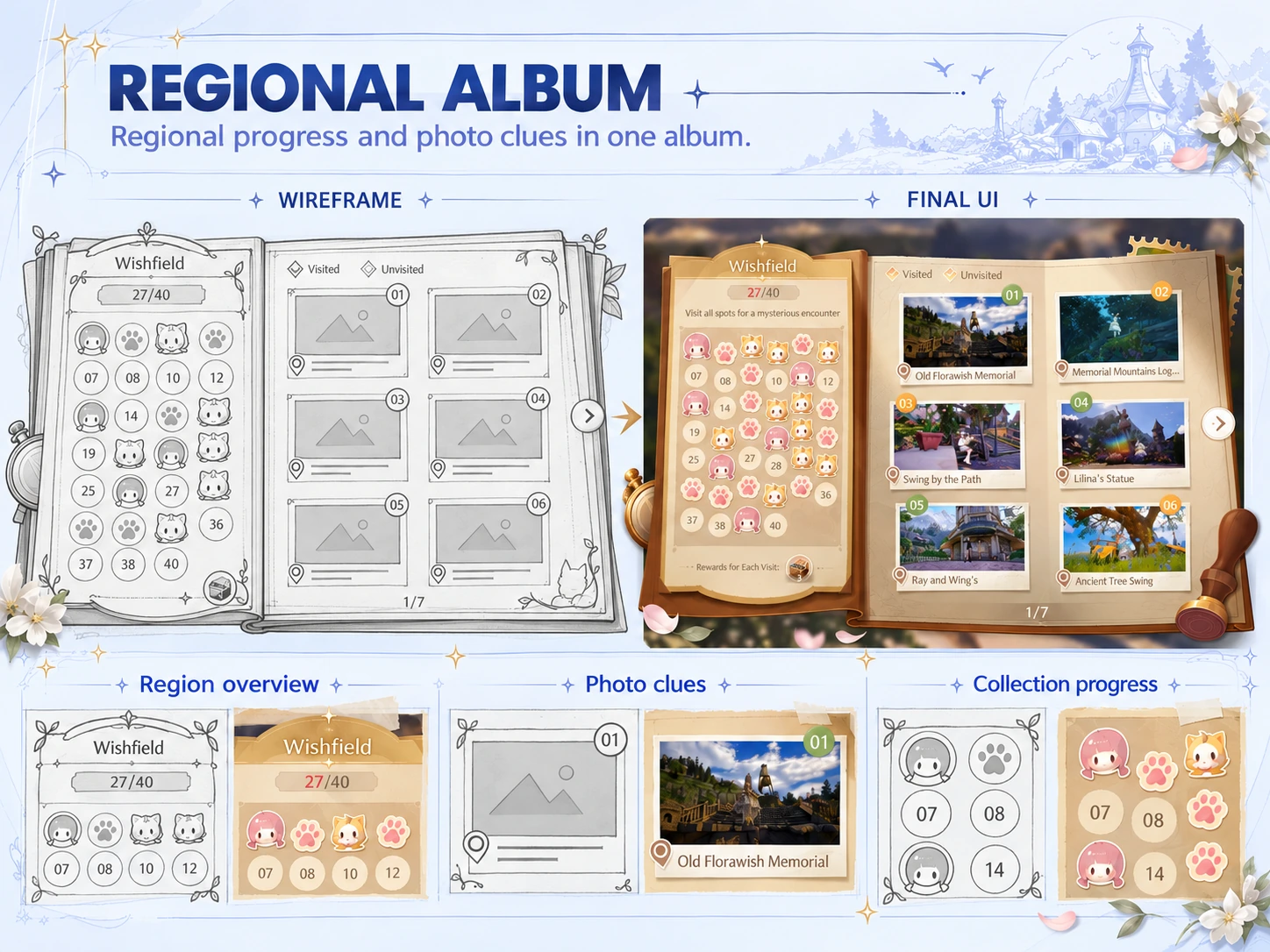 ← All projects↓
My work on Daily Wishes 2.0 and Expeditions connects what players see with the rules behind it: readable objectives, task pools that follow story progress and regional albums that guide exploration.
Task rules and exploration feedback that follow player progress.
Redesigned task eligibility and the 2.0 task/reward interface, while retaining shared objectives across versions.
See the design details ↓Organized region progress and photo entries into stable regions from wireframe to final UI.
See the design details ↓Defined the locked/clue/recorded sequence and when players can view newly unlocked entries.
See the design details ↓01 / DAILY WISHES UI
The original 1.0 screen and the 2.0 redesign below are shown separately. The redesign introduces Daily Wishes and Starlit Moments tabs, groups activity rewards in a right-hand column and combines familiar bottle motifs with new shell visuals. Shared tasks retain their objective and progress when their version appearance changes.
02 / TASK SELECTION
Gameplay progress and unlocked regions determine which tasks are eligible. The supplied rule diagram separates three cases: only 1.0 unlocked, only 2.0 unlocked, or both unlocked. Each pool includes common tasks and the eligible version tasks. Random selection then draws from that pool regardless of the player’s current region.
03 / REGIONAL ALBUM
The regional album keeps collection progress on the left and location entries on the right. The wireframe and final UI use the same division. Region information helps players review overall progress, while reference photos help identify individual locations and recorded photos show completed check-ins.
04 / PHOTO CHECK-IN STATES
The three entry states below are shown in order. A locked location hides its details. Once available, a reference photograph helps players find the place. Completing the check-in replaces that reference with the player’s own photo. This sequence separates finding the location from recording a visit.
05 / NEW-ENTRY NOTIFICATION
The notification announces newly unlocked photo spots. View now opens the corresponding album entry. The documented Later behavior retains the notice until the next game session, so players can continue their current activity before reviewing the album. The annotated source below shows both intended responses beside the notification.